Creating a training and validation dataset
For the dataset, Recognite expects a simple CSV file with at least two columns: one column to indicate the image path and another column to give the corresponding label. For example:
image,label
gerda_pic.jpg,gerda
another.jpg,gerda
some_dir/some_image.jpg,erik
another_dir/ya_erik.jpg,erik
gerda.png,gerda
...
Note
It is entirely up to you how you structure your data and how you name the image and label column. The only restriction here is that the labels should be exactly the same (i.e., case-sensitive) for images that belong to the same class.
Let’s say you have written your CSV file to my_data.csv. Then you can create training and validation datasets as follows:
from recognite.data import train_val_datasets

ds_train, ds_val_gal, ds_val_quer = train_val_datasets(
    'my_data.csv',      # Path to your CSV file
    image_key='image',  # The column containing the image paths
    label_key='label',  # The column containing the labels

    num_folds=5,        # The number of folds to use for the train-val split
    val_fold=0,         # Which fold to use as validation set
    fold_seed=42,       # The random seed for choosing the folds

    num_refs=2,         # The number of references used in the gallery
    ref_seed=42,        # The random seed for selecting the references

    tfm_train=None,     # The transformation pipeline for the training set
    tfm_val=None,       # The transformation pipeline for the validation sets
)
There are a couple of things going on here. Let’s break them down:
The first three arguments are related to the CSV file that describes your dataset. You provide the path to the CSV file and the names of the columns that give the image paths and their corresponding labels.
The following three arguments (
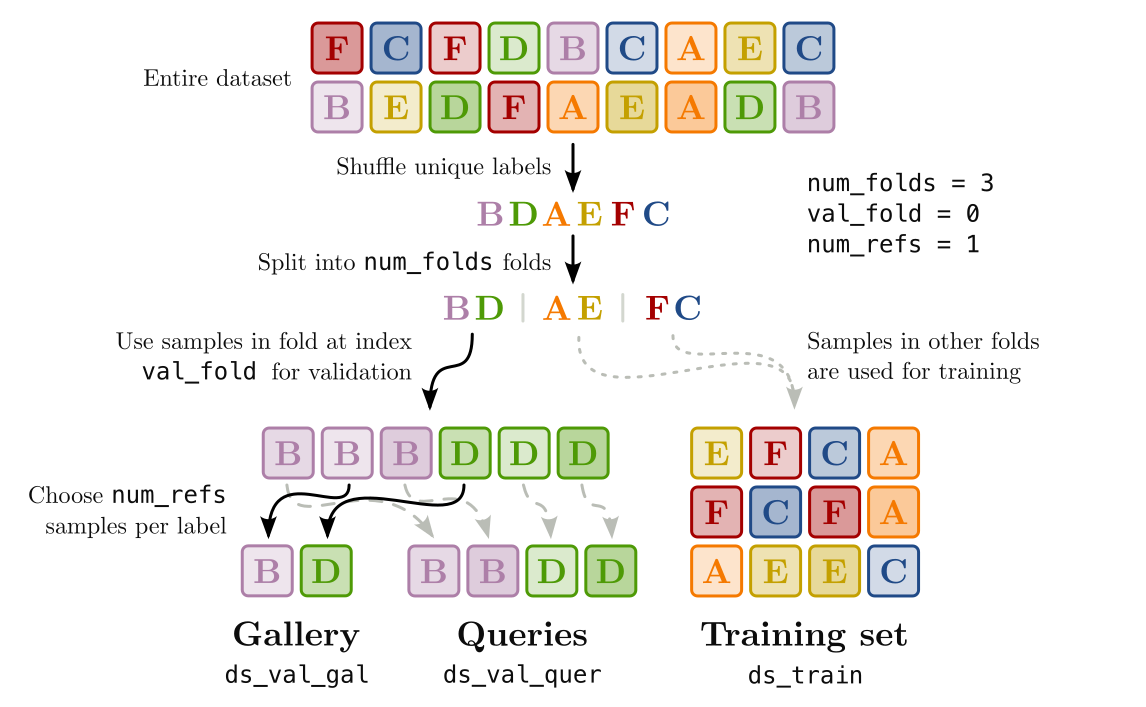
num_folds,val_foldandfold_seed) determine which data will be put in the training set and which data will be put in the validation set. Recognite shuffles the set of labels present in your dataset and divides them intonum_foldapproximately equal folds. Withval_fold, you can choose which of these folds should be used for the validation dataset, and withfold_seedyou can change the shuffling result. By fixingnum_foldsandfold_seedand lettingval_foldrange from0tonum_folds - 1, you can easily perform K-fold cross validation. Note that different folds not only contain different samples, but also different labels. This is to reflect the ultimate goal of a recognition model, i.e., to recognize classes that were not used during training.The next two arguments (
num_refsandref_seed) define how the validation samples are distributed among the gallery validation dataset (ds_val_gal) and the query validation dataset (ds_val_quer). During validation, the samples in the gallery are used as references for the respective classes and the query samples are compared with each of these references. From the resulting similarity scores, the model performance can be evaluated. For the gallery set, Recognite randomly selectsnum_refssamples (seeded byref_seed) for each label in the validation dataset. The other samples are put into the query set.With the final arguments (
tfm_trainandtfm_val), you can pass in the image transformation pipeline to use for the training and the validation data, respectively. This could, for example, be a pipeline built with TorchVision transforms, but any other callable that takes in a single PIL Image and returns the transformed version should work fine. When the transforms are set toNone(the default), no transforms will be applied to the images.
The process of splitting the dataset is illustrated in the figure below. Each square represents a sample in the dataset and the letters indicate the class label.